Mi configuración personal de dotfiles para tener un entorno de trabajo limpio, productivo y visualmente consistente.
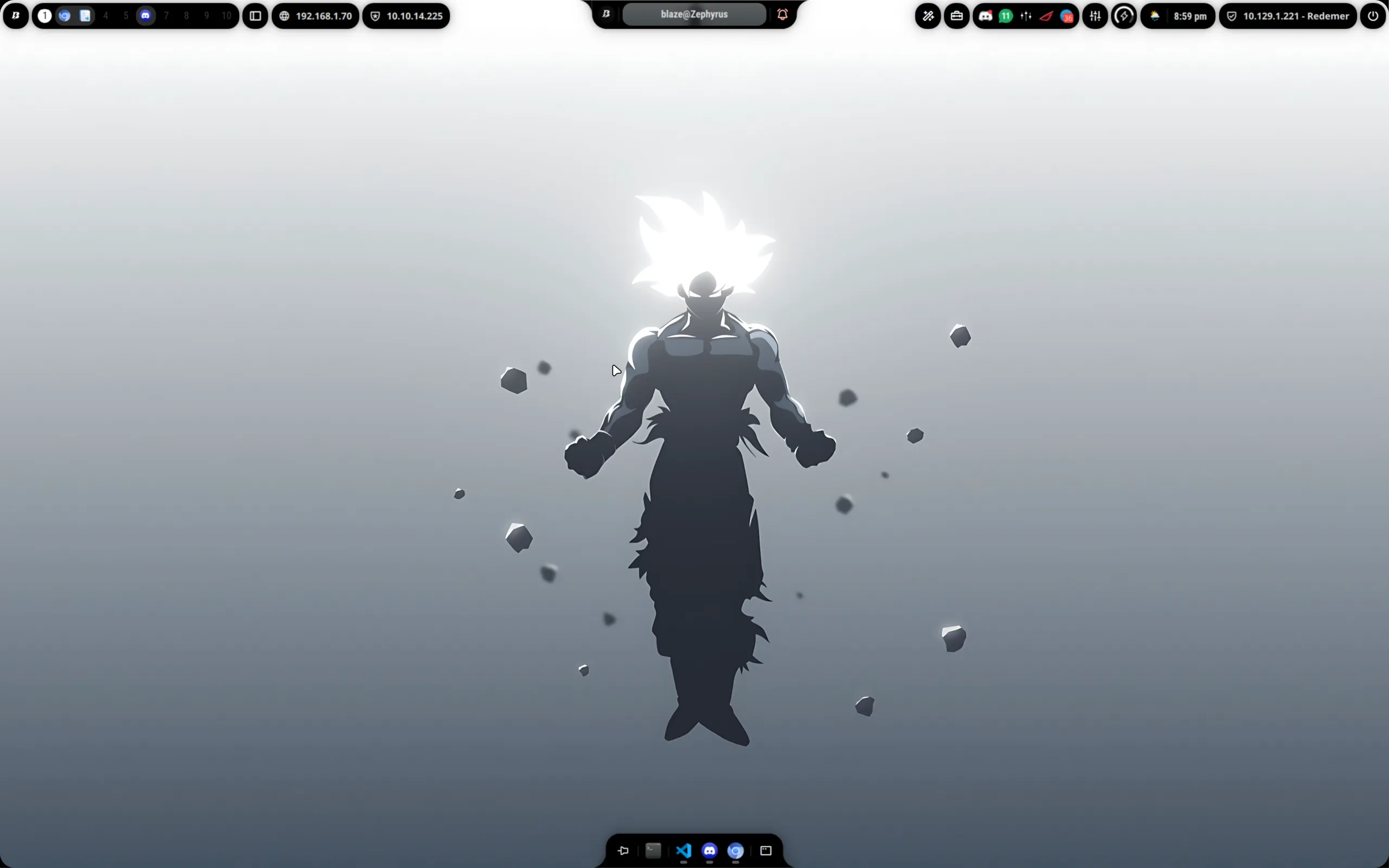
Este setup incluye configuraciones para Hyprland, Kitty, Zsh con Powerlevel10k, lsd, así como fuentes, iconos y wallpapers. Además, el UI shell está basado en Ambxst.
Puedes encontrar todos los archivos de configuración listos para clonar en mi repositorio de GitHub.
Contenido
Hyprland
Mi entorno de ventanas principal es Hyprland, un compositor dinámico de cuadrículas (tiling Wayland compositor) focalizado en el aspecto visual.
Mi configuración está modularizada para mantener todo ordenado. El archivo principal simplemente importa el resto de las configuraciones:
# =========================================================
# Hyprland v0.54.1 (2026) - hyprland.conf
# Config modularizada en conf/*.conf
# =========================================================

source = ~/.config/hypr/conf/env.conf
source = ~/.config/hypr/conf/monitors.conf
source = ~/.config/hypr/conf/workspaces.conf
source = ~/.config/hypr/conf/general.conf
source = ~/.config/hypr/conf/input.conf
source = ~/.config/hypr/conf/decoration.conf
source = ~/.config/hypr/conf/animations.conf
source = ~/.config/hypr/conf/rules.conf
source = ~/.config/hypr/conf/binds.conf
source = ~/.config/hypr/conf/startup.conf
Para ver el contenido de cada módulo (animaciones, reglas, atajos de teclado, etc.), visita la carpeta conf/ en el repositorio.
Ambxst UI Shell
Para darle a Hyprland un ambiente de escritorio completo, utilizo Ambxst, un “UI shell” modular muy ligero y altamente personalizable.
Se encarga de levantar y renderizar la barra superior, el panel de control, widgets del escritorio y componentes esenciales visuales. Esto hace que el entorno de hacking no solo sea funcional mediante atajos de teclado, sino que también tenga botones limpios y menús consistentes con colores a medida.
Apariencia
El “look and feel” general se sostiene combinando estos elementos visuales:
Fuentes
- Hack Nerd Font: Mi fuente principal en la terminal. Excelente para leer código y compatible con cientos de glifos requeridos por Powerlevel10k e iconos en la terminal.
- Fuentes del Sistema: Usamos familias inter para las ventanas, dando a la pantalla una estética cristalina.
Iconos y Cursor
- Tema de Iconos: Toda mi interfaz e integraciones con aplicaciones gráficas usan el tema Kora.
- Mouse / Cursor: Utilizo el increíble ratón Bibata Modern Classic (
bibata-cursor-theme), el cual tiene trazos pulidos y oscuros que abandonan el puntero tosco tradicional.
Terminal y Utilidades
Kitty
Mi terminal principal es Kitty, un emulador de terminal basado en GPU.
kitty.conf
# Config

include color.ini

font_family Hack Nerd Font
font_size 23
disable_ligatures never

cursor_shape beam
cursor_beam_thickness 1.8

window_padding_width 10
background_opacity 0.92
dynamic_background_opacity yes
enable_audio_bell no

url_color #61afef
url_style curly
detect_urls yes

mouse_hide_wait 3.0

repaint_delay 10
input_delay 3
sync_to_monitor yes

tab_bar_style powerline
tab_powerline_style round
active_tab_background #51A4E7
active_tab_foreground #0d0f13
inactive_tab_background #336699
inactive_tab_foreground #dcdfe4
tab_title_max_length 24
tab_title_template "{index}: {title}"
active_border_color   #51A4E7
inactive_border_color #51A4E7
window_border_width   2 pt

confirm_os_window_close 1

map ctrl+shift+h neighboring_window left
map ctrl+shift+l neighboring_window right
map ctrl+shift+k neighboring_window up
map ctrl+shift+j neighboring_window down

map ctrl+shift+enter new_window_with_cwd
map ctrl+shift+t new_tab_with_cwd
map ctrl+shift+z toggle_layout stack
map ctrl+shift+i set_tab_title

shell zsh
color.ini
# Theme
foreground #dcdfe4
background #0d0f13

color0  #1e2124
color1  #f04747
color2  #43b581
color3  #faa61a
color4  #51A4E7
color5  #9b59b6
color6  #00b0f4
color7  #979c9f
color8  #1e2124
color9  #f04747
color10 #43b581
color11 #faa61a
color12 #51A4E7
color13 #9b59b6
color14 #00b0f4
color15 #dcdfe4

cursor #7289da
cursor_text_color #ffffff
selection_foreground #ffffff
selection_background #7289da
Zsh
Zsh es la shell interactiva del entorno. La productividad aquí recae en un balance entre plugins rápidos de resaltado (syntax highlighting) y un prompt poderoso.
zshrc
Esta es mi configuracion para la zshrc.
# Powerlevel10k instant prompt
if [[ -r "${XDG_CACHE_HOME:-$HOME/.cache}/p10k-instant-prompt-${(%):-%n}.zsh" ]]; then
  source "${XDG_CACHE_HOME:-$HOME/.cache}/p10k-instant-prompt-${(%):-%n}.zsh"
fi

# Completion
autoload -Uz compinit
zmodload zsh/complist
compinit

command -v dircolors >/dev/null && eval "$(dircolors -b)"

zstyle ':completion:*' auto-description 'specify: %d'
zstyle ':completion:*' completer _expand _complete _correct
zstyle ':completion:*' format 'Completing %d'
zstyle ':completion:*' group-name ''
zstyle ':completion:*' menu select=long
zstyle ':completion:*' list-colors ${(s.:.)LS_COLORS}
zstyle ':completion:*' list-prompt '%SAt %p: Hit TAB for more, or the character to insert%s'
zstyle ':completion:*' matcher-list '' 'm:{a-z}={A-Z}' 'm:{a-zA-Z}={A-Za-z}' 'r:|[._-]=* r:|=* l:|=*'
zstyle ':completion:*' select-prompt '%SScrolling active: current selection at %p%s'
zstyle ':completion:*' use-compctl false
zstyle ':completion:*' verbose true

zstyle ':completion:*:*:kill:*:processes' list-colors '=(#b) #([0-9]#)*=0=01;31'
zstyle ':completion:*:kill:*' command 'ps -u $USER -o pid,%cpu,tty,cputime,cmd'

# Prompt
[[ -r "$HOME/.powerlevel10k/powerlevel10k.zsh-theme" ]] && source "$HOME/.powerlevel10k/powerlevel10k.zsh-theme"
[[ -r "$HOME/.p10k.zsh" ]] && source "$HOME/.p10k.zsh"

# PATH
typeset -U path PATH
path=(
  $HOME/.local/bin
  $HOME/go/bin
  $HOME/.cargo/bin
  /snap/bin
  /usr/local/sbin
  /usr/local/bin
  /usr/sbin
  /usr/bin
  /sbin
  /bin
  /opt/android-studio/bin
  /opt/SCANPROYECT
  $path
)
export PATH

# Aliases
if command -v lsd >/dev/null; then
  alias ls='lsd --group-dirs=first'
  alias l='lsd --group-dirs=first'
  alias ll='lsd -lh --group-dirs=first'
  alias la='lsd -a --group-dirs=first'
  alias lla='lsd -lha --group-dirs=first'
fi

command -v bat >/dev/null && alias cat='bat --paging=never'
alias catn='/usr/bin/cat'

# fzf
command -v fzf >/dev/null && source <(fzf --zsh)

# Functions
tun0() {
  ip -brief addr show dev tun0
}

fzf-lovely() {
  local preview='[[ $(file --mime -- {}) =~ binary ]] &&
    echo "{} is a binary file" ||
    (bat --paging=never --style=numbers --color=always -- {} ||
     highlight -O ansi -- {} ||
     coderay {} ||
     rougify {} ||
     /usr/bin/cat -- {}) 2>/dev/null | head -500'

  if [[ $1 == h ]]; then
    fzf -m --reverse --preview-window down:20 --preview "$preview"
  else
    fzf -m --preview "$preview"
  fi
}

# Keybindings
bindkey "^[[H" beginning-of-line
bindkey "^[[F" end-of-line
bindkey "^[[3~" delete-char
bindkey "^[[1;3C" forward-word
bindkey "^[[1;3D" backward-word

# Plugins
[[ -r /usr/share/zsh/plugins/zsh-sudo/sudo.plugin.zsh ]] && \
  source /usr/share/zsh/plugins/zsh-sudo/sudo.plugin.zsh

[[ -r /usr/share/zsh/plugins/zsh-syntax-highlighting/zsh-syntax-highlighting.zsh ]] && \
  source /usr/share/zsh/plugins/zsh-syntax-highlighting/zsh-syntax-highlighting.zsh

# Finalize Powerlevel10k instant prompt
(( ! ${+functions[p10k-instant-prompt-finalize]} )) || p10k-instant-prompt-finalize
p10k.zsh
El prompt enriquecido está motorizado directamente por Powerlevel10k. Ofrece indicadores visuales de Git, entornos virtuales, tiempo de ejecución y privilegios de root sin lag al digitar comandos.
(Nota: el archivo .p10k.zsh es inmenso. Te animo a descargarlo directamente clonando mi repo de dotfiles en GitHub para exportar mis exactas mezclas de colores y paletas de iconos en tu terminal).
lsd
El antiguo ls es cosa del pasado. Por eso uso lsd, que provee iconos nativos y árboles de directorio repletos de color:
# ~/.config/lsd/config.yaml
classic: false
blocks:
  - permission
  - user
  - group
  - size
  - date
  - name
color:
  when: auto
  theme: default
icons:
  when: auto
  theme: fancy
  separator: "  "
Neovim (NvChad)
Para editar scripts locales, modificar plantillas para exploits y leer código fuente enorme sin salir jamás de la línea de comandos, mi editor must-have es Neovim.
Para evitar configurar Neovim desde ceros cada reinicio de equipo, este entorno automatiza y se base en la plantilla estructural de NvChad; la cual otorga al instante un IDE rápido dotado con LSP (servidor de sugerencia y auto-completado), Telescope (buscadores fuzzy para saltos rápidos entre funciones/archivos locales) y árboles de directorios (nvim-tree). Totalmente adaptable a nuestros colores de la kitty.conf.